You’re done with Gmail scanning your emails for ads. You want privacy, but you also need something that just works day to day. That’s where Proton Mail vs Fastmail comes in.
Both promise secure email with no ads and no data selling. But they take wildly different approaches. One built its name on end-to-end encryption and Swiss privacy laws. The other built a reputation on speed, reliability, and thoughtful productivity tools.
Get premium, end-to-end encrypted email - $1.00 / month. 
So in this Proton Mail vs Fastmail comparison, we’ll break down security, pricing, features, and real-world use. By the end, you’ll know which one fits your inbox, your budget, and your privacy goals.
Proton Mail vs Fastmail: The Biggest Difference
At a glance, both services look similar. They are ad free, privacy conscious, and independent alternatives to Gmail.
But their priorities are completely different.
Proton Mail Focuses on Privacy First
Get premium, end-to-end encrypted email - $1.00 / month.
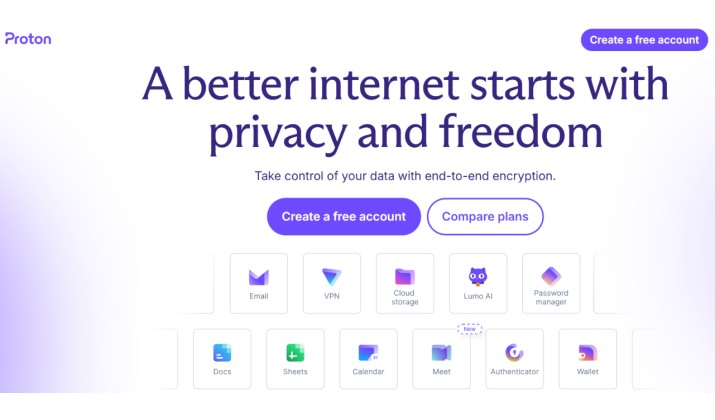
Proton Mail was built by scientists from CERN with a strong privacy mission. The platform uses end to end encryption for emails sent between Proton users. It also stores data in Switzerland, a country known for strict privacy laws.
The entire ecosystem revolves around security and data protection.
You also get access to:
- Proton VPN
- Proton Drive
- Proton Pass password manager
- Proton Calendar
If you want encrypted email services with strong privacy protections, Proton Mail clearly targets that audience.
Get premium, end-to-end encrypted email - $1.00 / month.
Fastmail Focuses on Usability and Productivity
Fastmail takes a different approach.
Instead of building a privacy ecosystem, Fastmail concentrates on making email efficient, fast, customizable, and pleasant to use every day.
You get:
- Excellent search
- Fast syncing
- Smart organization tools
- Custom domains
- Reliable calendar and contacts
- Strong spam filtering
Fastmail does not offer default end to end encryption like Proton Mail. Still, it earns praise because it avoids ads and does not sell your data.
That difference shapes almost every part of the Proton Mail vs Fastmail debate.
Also read: Tuta vs Proton Mail
Is Proton Mail More Secure Than Fastmail?
Yes. If security and encryption matter most, Proton Mail wins.
Get premium, end-to-end encrypted email - $1.00 / month.
Proton Mail Security Features
ProtonMail uses end-to-end encryption for all emails between Proton Mail users. Even Proton Mail can’t read them. For emails to Gmail or Outlook, you can set a password and send an encrypted message. The subject line still isn’t encrypted, but the body and attachments are.
Here’s a list of Proton Mail’s security features:
- End to end encryption between Proton users
- Zero access encryption
- Encrypted inbox storage
- Encrypted calendar and files
- Open source apps
- Two factor authentication
- Hardware security key support
That level of protection makes it one of the strongest encrypted email services available today.
Fastmail Security Features
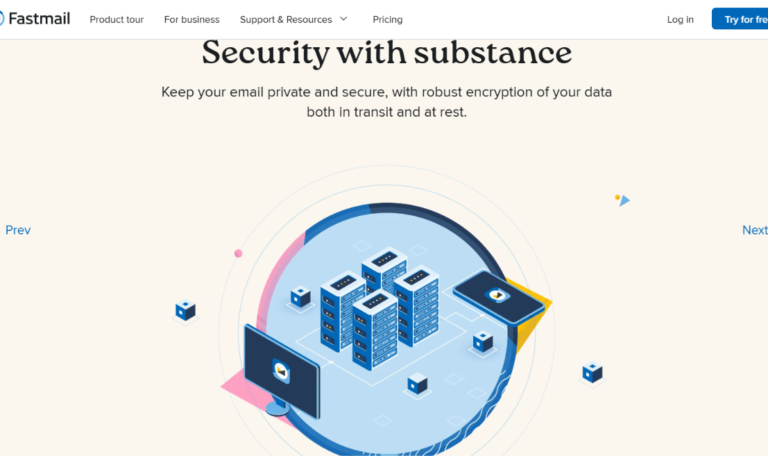
Fastmail offers solid protection with its two factor authentication, spam/phishing protection, app passwords. account recovery controls, and secure IMAP and SMTP.
It uses TLS encryption in transit and encrypts your data at rest on its servers. Fastmail’s team can technically access your mailbox if legally compelled, because they hold the keys. That’s the trade-off for features like lightning-fast search and server-side filtering.
However, not everyone needs military style encryption for everyday email. You may simply want an inbox that:
- Does not track you
- Does not show ads
- Does not build advertising profiles
- Respects user privacy
Fastmail does all of that well. It also has a good reputation for transparency and user trust.
Still, Proton Mail pushes privacy much further. If you work with sensitive information, activist communication, journalism, legal work, or confidential business discussions, Proton Mail offers stronger protection.
Read this too: 15 Best Proton Mail Alternatives
Which Is Better for Everyday Use: Proton Mail or Fastmail?
This depends on how you use email daily.
Fastmail Feels Smoother for Heavy Email Users
Fastmail shines when you spend hours managing email.
The interface feels lightweight and responsive. Search is excellent. Folders, labels, filters, and rules work beautifully. Everything loads quickly.
Power users especially appreciate:
- Keyboard shortcuts
- Fast inbox search
- Better IMAP support
- Flexible organization tools
- Advanced filtering options
If productivity matters most, Fastmail often feels more polished.
Proton Mail Prioritizes Security Over Convenience
Proton Mail has improved massively over the last few years, but encryption creates some limitations.
Search performance still feels more restricted compared to Fastmail. Some advanced email workflows are less flexible. Third party app integration also requires Proton Bridge on desktop clients.
That said, Proton Mail now looks cleaner and more modern than older versions. Most casual users will find it perfectly usable.
Still, for raw speed and workflow efficiency, Fastmail usually wins.
So if you are comparing Proton Mail vs Fastmail for personal email and daily productivity, Fastmail often feels easier to live with.
Get premium, end-to-end encrypted email - $1.00 / month.
Proton Mail vs Fastmail: Pricing, Storage, and Features Compared Side by Side
Let’s talk money and megabytes. This is where Proton Mail vs Fastmail pricing, storage, and features compared side by side gets interesting.
|
Feature |
Proton Mail |
Fastmail |
|---|---|---|
|
Free Plan |
Yes. 1 GB storage, 1 address, 150 messages/day |
No free plan. 30-day trial only |
|
Starting Paid Plan |
Mail Plus: $3.99/mo. 15 GB, 10 addresses, 1 custom domain |
Basic: $3/mo. 2 GB, 1 custom domain, 600 aliases |
|
Storage on Mid Tier |
Unlimited Plan: $9.99/mo for 500 GB shared across Proton ecosystem |
Standard: $5/mo for 30 GB email + 30 GB files |
|
Custom Domains |
Yes, on paid plans. 1 domain on Mail Plus, 3 on Unlimited |
Yes on all paid plans. Unlimited domains |
|
Aliases + Masked Email |
Up to 10 with Mail Plus. Unlimited with SimpleLogin integration |
600 masked email addresses included |
|
Ecosystem |
Email, VPN, Drive, Pass, Calendar |
Email, Calendar, Contacts, Files only |
|
Ads |
None. Funded by paid users |
None. Paid only plans fund the service |
*Pricing plans are subject to change
If you need a free plan, Proton Mail wins by default. If you’ll pay anyway, Fastmail gives you more aliases and domains at lower tiers.
Proton Mail Pricing and What You Get
Get premium, end-to-end encrypted email - $1.00 / month.
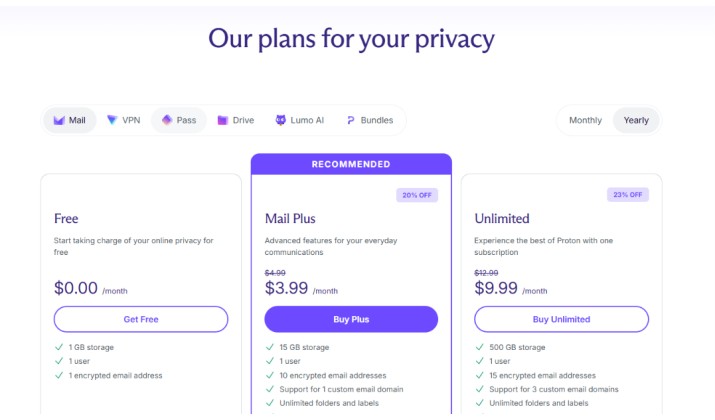
Proton Mail offers both free and paid plans, which makes it appealing if you want to test a privacy focused email provider before committing money.
The free plan includes:
- 1 GB storage
- 1 email address
- Basic encrypted email access
It works well for casual users who mainly want a secure Gmail alternative without monthly costs.
If you need more storage and productivity features, Proton offers paid tiers like Mail Plus and Unlimited.
Mail Plus adds:
- 15 GB storage
- 10 email addresses
- 1 custom domain
- 10 hide my email aliases
- Desktop app access
- Advanced inbox features
The Unlimited plan expands things much further with:
- 500 GB shared storage
- Proton VPN
- Proton Drive
- Proton Pass
- More custom domains and aliases
That bundled ecosystem is one reason many users see Proton as one of the best Gmail alternatives.
Another interesting read: 15 Best Alternatives to Yahoo and AOL Mail
Fastmail Pricing and What You Get
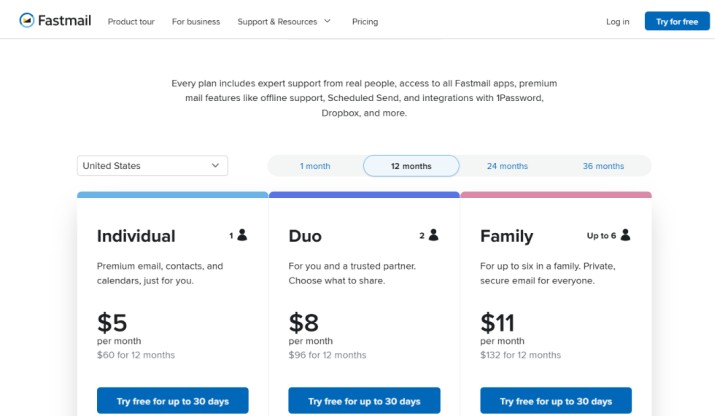
Fastmail’s pricing takes a completely different approach. There is no permanent free plan. Instead, Fastmail offers a trial period and then moves directly into paid subscriptions.
Its individual plans currently start around $6 per month, while Duo and Family plans increase storage and user limits. Business plans are also available for teams and companies.
Even the entry level plan includes features many users actually care about daily:
- Custom domains
- Fast search
- Calendars and contacts
- Masked email support
- IMAP and SMTP access
- Ad free email experience
Fastmail focuses less on bundled privacy tools and more on creating a polished email platform with excellent usability.
For users who spend hours managing inboxes, the pricing often feels justified because the service stays fast, clean, and highly reliable.
ProtonMail vs Fastmail Performance: Speed, Reliability, and Search
You open your inbox 20 times a day. Slow is painful.
Fastmail is famous for speed. Search is instant across 10 years of mail. The web app loads fast and the mobile apps are native. Filters run server-side, so rules apply even when you’re offline.
Search remains one of Fastmail’s strongest advantages. Messages appear quickly, syncing feels fast, and large inboxes remain manageable.
That matters if you:
- Archive years of email
- Handle business communication
- Search attachments regularly
- Manage multiple accounts
Proton Mail improved a lot since 2023. The new web app is snappy, and mobile apps finally feel modern. But search is the gap. Because your mailbox is encrypted, Proton Mail can’t read it to index it.
You either search locally cached mail or wait for their encrypted search to scan your inbox. It works, but it’s slower than Fastmail. You may notice slower indexing and less flexible search in some situations.
For uptime, both are excellent. Fastmail publishes status publicly and has a strong record. Proton Mail had some DDoS issues years ago but now runs on hardened infrastructure.
For pure email performance, Fastmail takes the crown for power users and productivity tools.
You might like this: Is Proton Mail the Ultimate Secure Email Solution?
Proton Mail vs Fastmail for Family, Duo, and Small Business Email Plans
Both providers now support families and teams well.
Proton Mail for Privacy Focused Teams
Proton offers business tools designed around secure communication and GDPR focused privacy.
This appeals to:
- Journalists
- Lawyers
- Privacy conscious startups
- Remote teams
- Security focused organizations
Its encrypted ecosystem also helps businesses that want private document storage and VPN access under one subscription.
Fastmail for Practical Business Communication
Fastmail works beautifully for small teams that prioritize productivity. Its admin tools, custom domain setup, and organization features feel straightforward and efficient.
If your business mainly wants reliable email without extra complexity, Fastmail is often easier to manage.
So when looking at email options for custom domains and business use, the better option depends on whether you value privacy or workflow simplicity more.
Should I Switch from Gmail to Proton Mail or Fastmail
Yes, if you care about privacy. Both are strong Gmail alternatives.
Switch to Proton Mail if:
- You want end‑to‑end encryption by default
- You like the idea of one privacy ecosystem
- You need a free plan to start
- Swiss jurisdiction matters to you
Switch to Fastmail if:
- You need instant search and fast filters
- You use custom domains heavily
- You want 600 masked emails baked in
- You prefer a company that only does email
Both platforms deliver secure email with no ads and no data selling, which already puts them ahead of many mainstream providers.
Which Is Better for Degoogling and Long Term Privacy: ProtonMail or Fastmail?
For full degoogling, Proton Mail is the stronger choice. Its growing ecosystem lets you replace several Google services at once:
- Gmail
- Google Drive
- Google Password Manager
- Google Calendar
- Chrome password syncing through Proton Pass
Fastmail works best as a premium email replacement rather than a complete Google alternative.
So if your goal involves reducing dependence on Big Tech entirely, Proton Mail fits better into that strategy.
So, Which Secure Email Wins?
Get premium, end-to-end encrypted email - $1.00 / month.
If privacy comes first, Proton Mail stands out as one of the strongest encrypted email services available today. It gives you serious security protections, strong GDPR alignment, and a growing ecosystem built around user privacy.
If you want a smoother email experience for daily use, Fastmail feels faster, cleaner, and more practical for heavy inbox management.
Both services respect users far more than traditional free email platforms, avoid ad driven business models, and offer a refreshing alternative to data hungry inbox providers.
The good news is simple. Either option moves you toward a more private, independent email experience.