Good design is invisible. Bad design makes people leave.
These days, a visitor decides in under 3 seconds whether to trust your site.
If the color scheme clashes, the fonts are unreadable, ads cover the content, or the page takes 8 seconds to become interactive, they don’t complain. They close the tab and never come back. That behavior is expensive.
Bad graphic design directly hurts conversion rate, credibility, time on site, and your Core Web Vitals which Google still uses to rank you. Here is an audit of 19 infamous examples of what not to do and what to take away from each one.
1. Craigslist.org
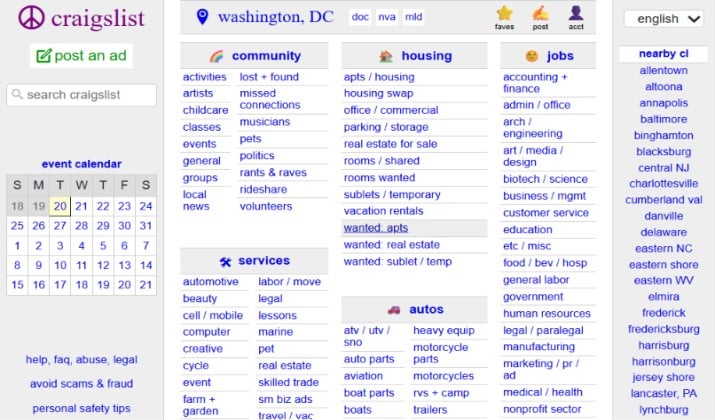
Craigslist has looked the same since 1995 and that is the point and the problem.
It features blue underlined links on a white background, tiny 12px system font, no images, no visual hierarchy, no branding, and category lists that run edge-to-edge.
Craigslist loads incredibly fast and has brutal scan-speed for power users who know where to look, which is why it still does billions in traffic.
For everyone else, especially new users and mobile users, it fails basic usability: no clear CTAs, filters that make sense, trust signals, and a homepage that looks like a directory from Windows 95.
It proves that familiarity can keep a bad design alive, but it will never convert a new audience.
The lesson here is that minimalism without hierarchy is not good design, it’s just absence of design.
Also read: Bad Email Examples You Should Never Send
2. EFTPS – The Federal Tax Payment System
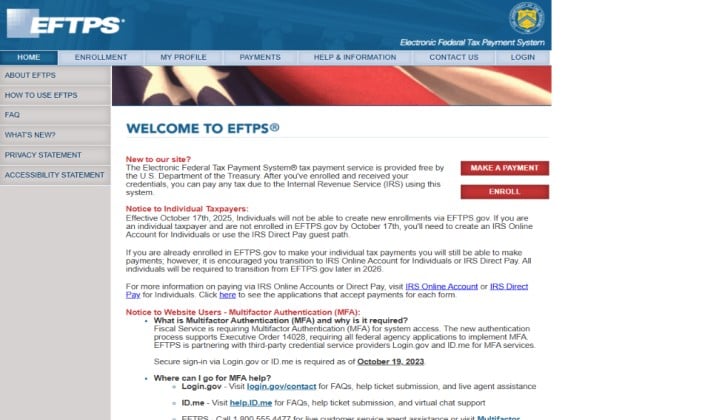
EFTPS.gov is the classic government UX problem.
In late 2023 it moved authentication to Login.gov and ID.me, breaking old bookmarks and confusing payroll teams who had used the same PIN for years.
The actual payment interface is still a narrow, center-aligned form floating in a sea of white space, with system fonts, no mobile layout, and cryptic error messages.
A 2025 executive order called “America by Design” was created specifically to fix federal sites like this, but EFTPS shows how hard it is to overhaul legacy systems that hold sensitive financial data.
3. The Daily Mail
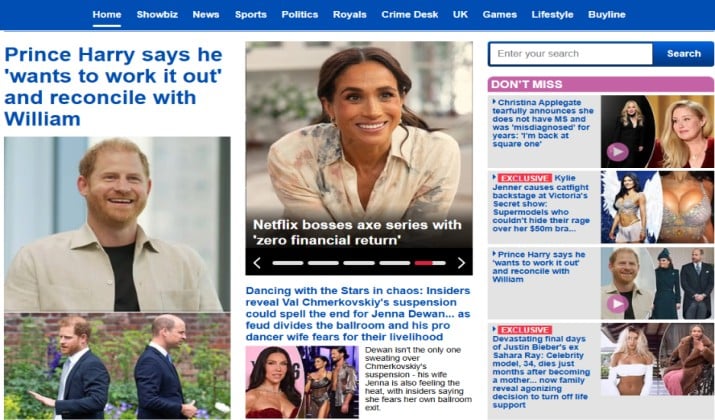
The Daily Mail is not badly designed by accident; it’s designed for maximum ad revenue.
Today, the homepage still loads 200+ stories in a three-column infinite scroll, with multiple auto-playing videos, a sticky video player that follows you, a pop-up asking for notifications, and sponsored links styled to look exactly like news.
It consistently scores poorly on Largest Contentful Paint and Interaction to Next Paint, often taking 7-10 seconds to become usable even on fast connections.
It proves clutter creates cognitive overload, even if it pays short-term.
Read this too: Epic Design Fails in Advertising
4. Suzanne Collins’ Official Site
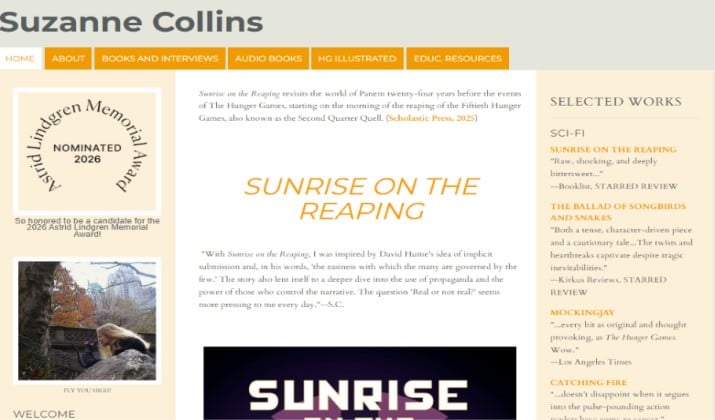
For an author behind The Hunger Games, Suzanne Collins’ official site is shockingly bare.
White background, default serif fonts, almost no imagery, and only six menu items: Home, About, Books & Interviews, Audio Books, HG Illustrated, and Educational Resources.
Her books are listed with one-liner reviews, There are no pull quotes or trailers. There are also no newsletter captures, media kits, or world-building.
It’s fast and readable, but for the current audience, it feels disconnected from a billion-dollar franchise that lives on visual culture.
5. Space Jam (1996)
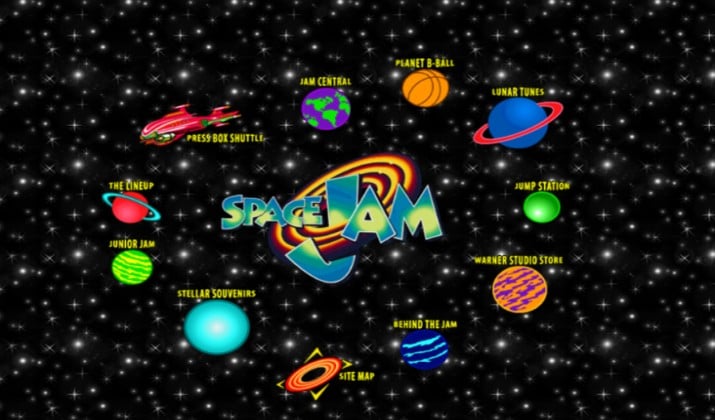
Warner Bros. intentionally left the original 1996 Space Jam movie website live as a time capsule.
Bright starry tiled background, centered yellow text, flashing star GIFs, image maps as navigation, hit counters, and a page that requires you to click through a maze of frames to find anything.
It is intentionally untouched since 1996 to preserve internet history. The site is not bad by accident. It is bad by era and that makes it perfect for this list.
It shows every early web mistake: no responsive layout, contrast control, or grid. It also has tiled backgrounds that fight text and navigation that depends on images loading.
What was acceptable in 1996 kills trust in the current age. If you don’t evolve your design, you become a museum piece.
Explore: Graphic Design Mistakes
6. Arngren.net
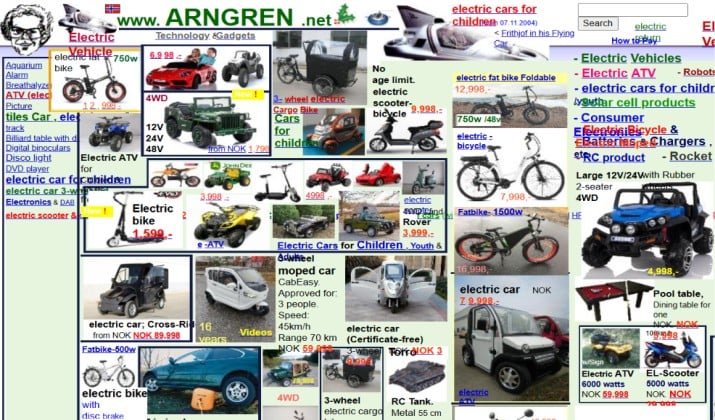
Arngren is still active in Norway. The store sells ATVs, drones, electric bikes, and gadgets.
But its homepage is a single, endlessly long page with hundreds of product images in different sizes, fonts, and colors crammed together with no white space, no clear categories, and no effective search.
The English version is identical. It ranks around 330k globally. It survives on word-of-mouth and morbid curiosity, not usability.
7. Drudge Report
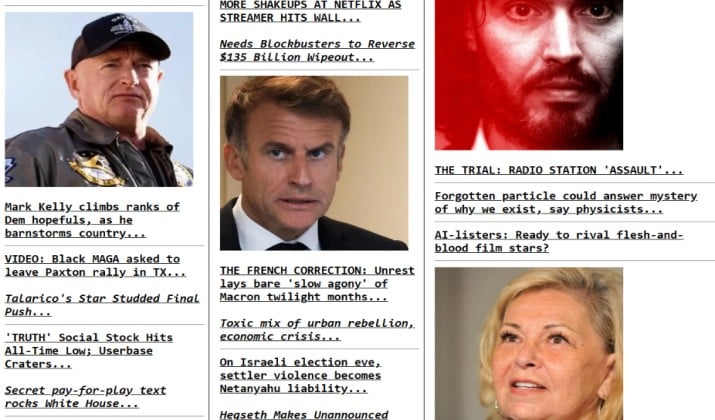
Matt Drudge launched in 1995 and the design has barely changed since the Clinton era.
Three columns of tiny, underlined black text links, minimal images, and a red siren GIF for breaking news. It still drives massive traffic because power readers love the scan density.
On mobile however, it’s a disaster. There are no responsive breakpoints or accessible headings. The headlines bleed off-screen and require horizontal scrolling.
It shows the cost of designing only for legacy users and ignoring new ones.
Check this out: Bad Advertising Examples
8. Yale School of Art
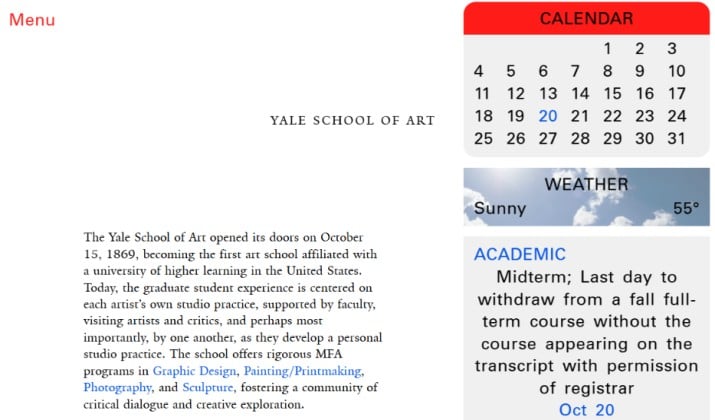
Yale School of Art’s site is famous for being intentionally editable.
Students can change the CSS live as part of the curriculum. The result is often completely unreadable: tiny white text on black, overlapping gradients, animated backgrounds, and inconsistent navigation that changes by the day.
The school announced in early 2025 that a new, accessible site designed by Brooklyn studio Other Means would launch for the 2026 academic year to fix this.
Even an art school needs to balance expression with function.
9. Gates N Fences
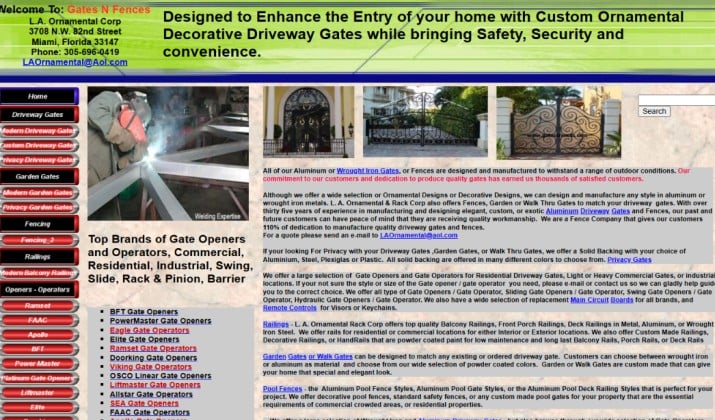
This Miami fencing company is still cited as the worst local business site.
Bright green header, red left navigation, yellow “FREE ESTIMATE” blinking GIFs, 11px body text crammed edge-to-edge, and keyword-stuffed paragraphs repeating “chain link fence Miami” dozens of times.
Some mirrors of the site still serve over HTTP, and the mobile version requires pinching to read anything.
It was built for search engines in 2005, not for humans in the current era.
10. Blinkee.com
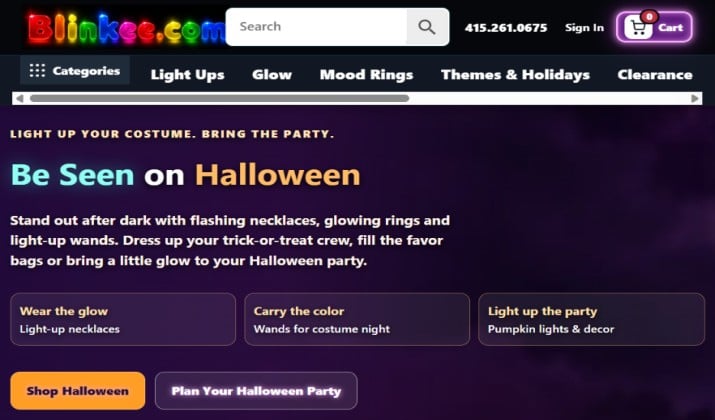
Blinkee sells blinking novelties such as LED shirts, flashing glasses, and glow sticks. So some blinking makes sense.
The site goes too far: every thumbnail blinks or glows, category pages have no filters, product photos have busy backgrounds that compete with the product, and the checkout flow feels like 2008.
It still lacks a proper mobile product grid for modern users.
The website proves that your product gimmick should not become your interface gimmick.
11. Ling’s Cars
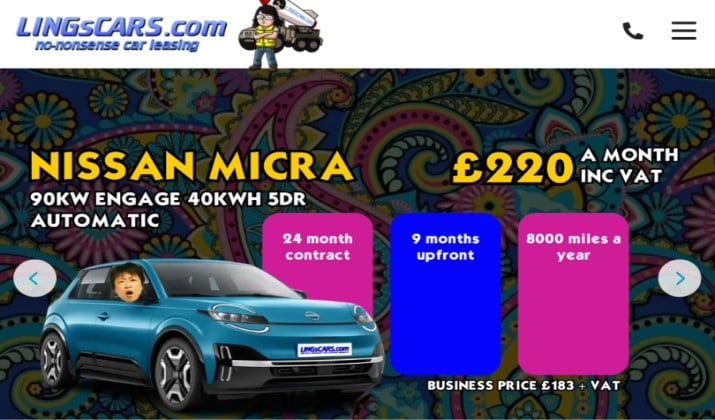
Ling Valentine’s car leasing site was voted the weirdest site on the internet for years, and she owned it.
Until February 2025 it featured her face in dozens of poses, karaoke, online games, a shop, and a loud tiled background.
In February 2025 it was redesigned. Animations were removed, the background was subdued, and the layout was calmed down. It still keeps its bold, maximalist personality with bright colors and lots of competing calls-to-action.
It’s intentionally chaotic as a brand differentiator, and it works because the chaos is the brand.
12. Jerry Pournelle’s Chaos Manor
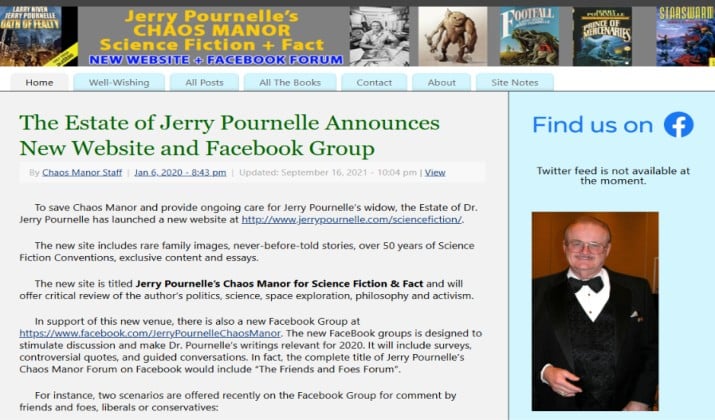
The late sci-fi author Jerry Pournelle died in 2017, but Chaos Manor remains online as an archive.
Grey background, default blue links (one famously has its last letter outside the hyperlink), long journal entries with no headings or table of contents, and inline images that don’t resize for mobile.
It was personal, prolific, and beloved, but visually inaccessible.
It is a reminder to plan for content legacy: what will your site look like when you stop updating it?
13. Jami Lin

Jami Lin’s site lists affiliate marketing, skincare, house astrology, “Earth Dances,” color alchemy, and chakras, all on the same homepage.
A low-resolution stock photo sits under “lots of FREE stuff,” a sidebar ad for “Clear Clutter” appears next to a completely cluttered layout, and multiple fonts, colors, and pop-ups fight for attention.
There is no clear value proposition in the first five seconds. The lesson here is if you do everything, you communicate nothing.
14. Berkshire Hathaway
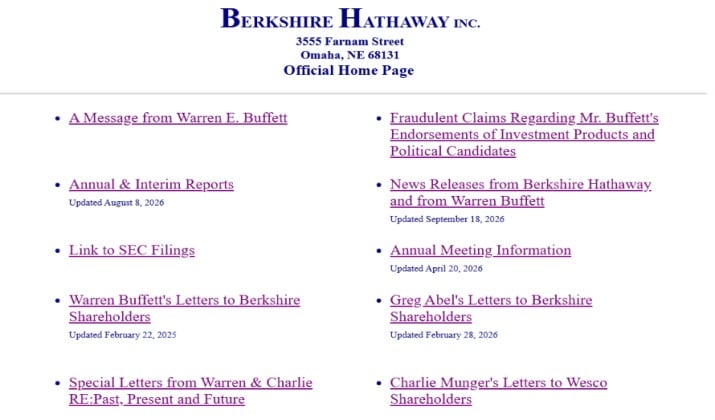
This is Warren Buffett’s conglomerate website.
It has looked the same since the 90s: white page, centered logo, a list of 20 blue underlined links, no images, CSS, or mobile layout.
There’s also no search option, or an about section with design. It loads in 0.2s because there is nothing to load. It stays up because investors want the shareholder letters, not the design.
For a $700B+ company, it is the ultimate anti-brand statement. It proves that “no design” is still a design decision, and it tells new visitors nothing about what the company actually does.
If you have extreme brand trust like Berkshire, you can get away with zero design. If you don’t, you will just look untrustworthy.
15. Heaven’s Gate

Maintained exactly as it was in 1997 by two former members, Heaven’s Gate is preserved as a time capsule.
Black background with starry tiled pattern, purple and red text, all-caps headings, left-aligned navigation that is just a long list of 30+ links with no grouping, and pages that are 10,000+ words of unformatted text with no headings.
It is historically important and intentionally untouched, like Space Jam. It shows every 90s mistake at once: poor contrast, no content hierarchy, tiled backgrounds that hurt readability, and navigation that overwhelms.
Remember that long-form content needs headings, contrast, and grouping. Archiving is fine, but don’t let your live business site look archived.
16. Zara

Zara’s website often takes an editorial approach to fashion e-commerce. Large photographs, minimal text, and discreet navigation make it feel more like a digital fashion magazine than an online store.
The problem arises when the visual experience takes priority over shopping.
Small labels, unconventional navigation, and the lack of prominent calls to action can make it harder for visitors to find products and understand where to go next.
17. The Big Ugly Website
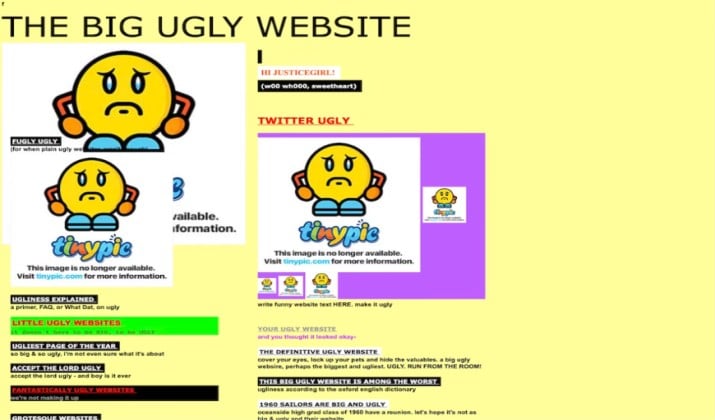
As its name suggests, The Big Ugly Website is an example of how poor visual choices can undermine an entire online experience.
Its deliberately unattractive presentation, clashing colours, weak layout, and confusing interactions make it difficult for visitors to navigate comfortably.
Even simple elements can become frustrating when the design offers little visual guidance.
18. Pacific Northwest X-Ray Inc.
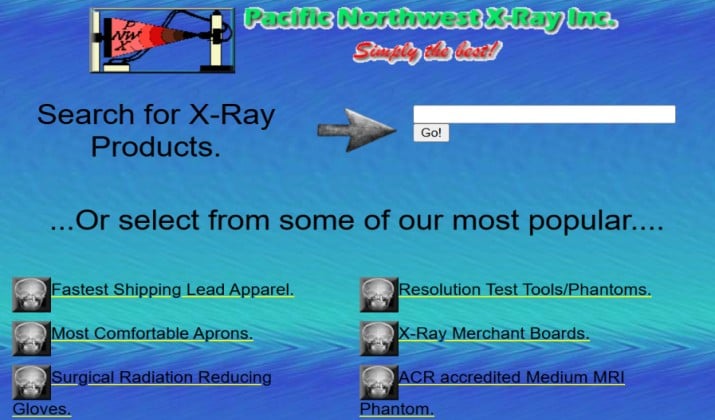
Pacific Northwest X-Ray Inc. has been cited in website design critiques as an example of an outdated visual presentation.
Small images, dated typography, and a crowded appearance can make technical product information harder to browse.
For a business serving a specialised industry, a website should help customers locate equipment details and product specifications without unnecessary effort.
19. Lipton
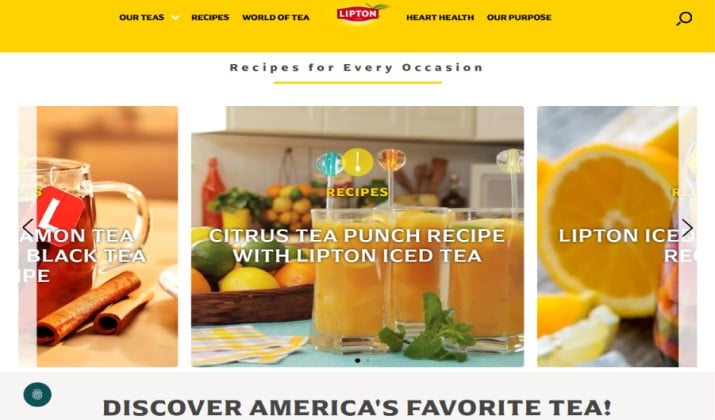
Lipton’s website uses bold colours, large product imagery, and promotional sections to capture attention. However, a page can contain plenty of attractive visuals and still lack a clear visual hierarchy.
When repeated promotional blocks interrupt the reading flow, dense text sits beside product imagery, and footer links lack organisation, visitors may struggle to distinguish important information from decoration.
20. Awwwards
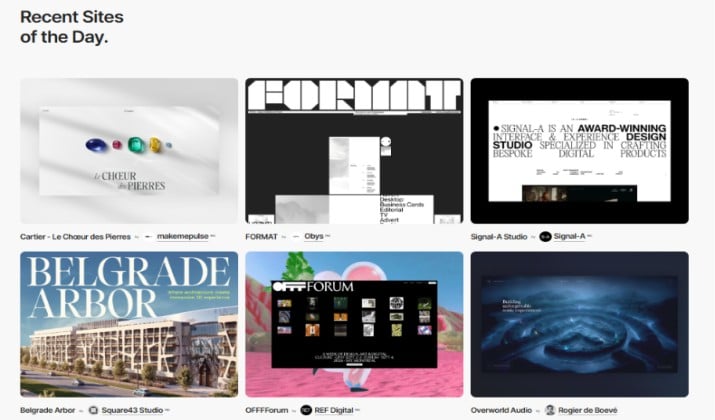
Awwwards showcases creative websites and celebrates ambitious digital design. Yet highly experimental navigation can make even a visually impressive site difficult to use.
When menus are unconventional, navigation options are scattered, or the route to a particular page is unclear, visitors have to spend time figuring out the interface instead of exploring the content.
What To Avoid, What To Do Instead
The same mistakes appear across all these examples.
Here’s what to avoid:
- Ugly or clashing colors with low contrast
- Flashing or auto-playing animation with no purpose
- Tiny fonts or more than two font families
- No white space
- Walls of text with no headings
- Too many ads, pop-ups, and competing CTAs
And here’s what to do instead:
- Use a 60-30-10 color rule (60% neutral background, 30% primary text, 10% accent)
- Stick to one readable sans-serif for body and one for headlines
- Use plenty of white space, keep black or charcoal text on white or off-white for long reading
- Break paragraphs into two to three lines
- Add descriptive headings and real, relevant images
- Make one primary action obvious per screen
- Design mobile-first
You don’t need to win design awards. You need to be clear, fast, and respectful of attention. The sites above are memorable because they failed at that.
Enjoyed the post?