Is Roblox safe for kids? If you have a child who plays, or who keeps asking to play, you have probably typed that exact question into Google.
Here is the honest answer. Roblox can be reasonably safe when you use the tools it gives you and you stay involved.
That is why it built age based accounts, parental controls, communication limits, spending limits, and reporting tools. When you set those up correctly, you shift the odds a lot more in your favor.
This guide walks through how it all works, so you can make a clear decision for your family.
Is Roblox Safe for Kids?
Roblox can be safe with strong parental controls and active supervision, but it is a large user-generated platform with social risks.
It is a platform where people create and share millions of Roblox experiences. Some are obstacle courses. Others are role play towns or horror themed stories. Because anyone can build, quality and maturity vary a lot.
On the safety side, Roblox has invested heavily in filters and human moderation. It scans images, text, and audio. The platform limits who can talk to whom based on age and it gives parents a linked parent account with parent privileges to manage a child account remotely.
Three things create most risks: user generated content that slips through, contact from strangers, and tricks that target kids for money or accounts.
So, Roblox safety for kids depends on how you set it up. With strong settings and ongoing check ins, many families find it works. Without settings, kids can run into content and conversations you would not want for them.
If you want a quick benchmark, Roblox itself says its Kids accounts for ages 5 to 8 have chat off by default, while Select accounts for ages 9 to 15 include age based communication and content guardrails. That default matters a lot.
Also read: Best Roblox Games to Play With Friends
What Age Is Roblox Appropriate For?
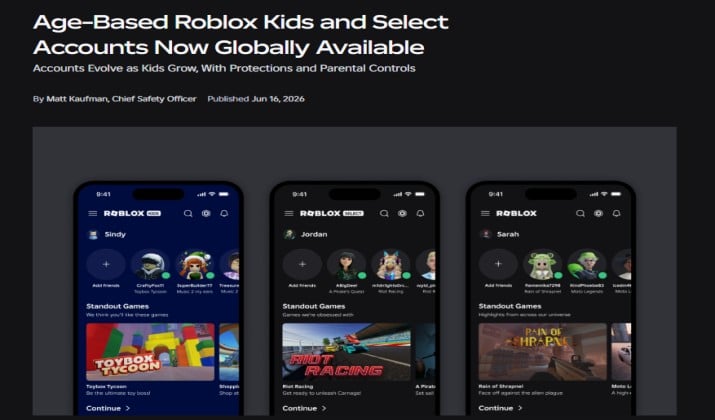
Roblox does not use a single age gate. It uses age based accounts that change what a child can see and do.
- Roblox Kids is for ages 5 to 8. Chat is off by default. Content maturity is locked to the lowest levels and social features are minimal. This is the most restricted mode and makes sense if you have a younger child who just wants to play.
- Roblox Select is for ages 9 to 15. This tier adds more guardrails that grow with age. A 9 year old does not get the same access as a 14 year old. Communication, content maturity, and discovery change based on the age check. Parents still control a lot through the linked parent account.
- Standard accounts start at 16. These have the broadest access to experiences, Party Chat, voice chat where available, and direct messages.
Age is only one part. Maturity matters too. A thoughtful 10 year old who follows rules may handle Select settings better than an impulsive 12 year old.
You know your child best. Start more locked down and open things over time if they show good judgment.
Roblox lists a general age rating of 10 plus in many app stores, but individual Roblox games inside the platform carry their own content ratings. That is why content maturity settings matter more than the store label.
What Are the Biggest Safety Risks on Roblox?
These are the patterns parents report most often.
1. Inappropriate user generated content. Even with filters, some creators push the edge with suggestive avatars, scary imagery, or violent role play. Moderation catches a lot, but not everything.
2. Chat risks. Experience Chat, Party Chat, and Direct Experience Chat let kids talk to strangers. Chat filters and chat moderation block many bad words and personal details, but determined users try to get around them with creative spelling.
3. Scams and phishing. Fake Robux offers, links that promise free items, or messages that say “trade off platform” are common. Kids click, log in on a fake site, and lose their account.
4. Bullying and harassment. Competitive games can turn toxic. Name calling, exclusion from private servers, or repeated targeting happens, just like on any social platform.
5. Predatory behavior. Roblox states it works to prevent this with age based restrictions and moderation, but any place where adults and kids can interact attracts people with bad intentions. Grooming often starts with friendship, gift giving in game, and requests to move to another app.
6. Spending pressure. Robux, in app purchases, game passes, and limited items create constant prompts to buy. Without a monthly spending limit, costs add up fast.
7. Too much screen time. The platform is designed to keep kids playing. Without screen time limits, sleep, homework, and mood can suffer.
Understanding Roblox dangers for kids helps you set clear rules.
How Do Roblox Parental Controls Work?
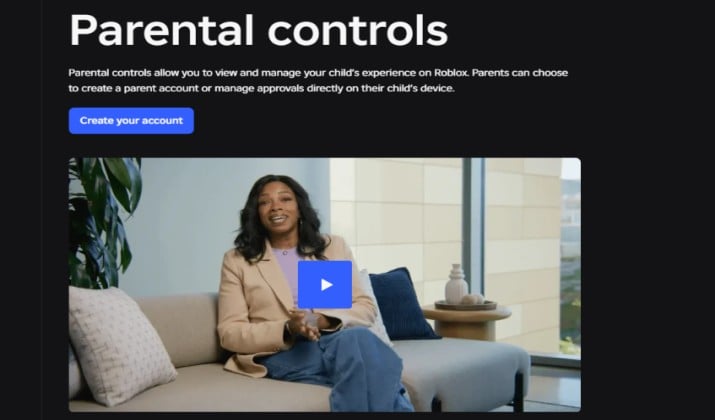
You create your own parent account, verify your identity, and link your child’s account. Once linked, you get parent privileges and you can manage settings from your phone or computer, even if your child is playing on another device.
Here is what you can control for children under 13 and for teens with some limits:
- Content maturity levels and content ratings for experiences
- Specific blocked experiences and experience blocking for individual titles
- Game approval settings where you can require permission for moderate content
- Contacts management, including friend requests and who can invite to private servers
- Communication controls for chat, Party Chat, and direct messages
- Screen time limits and screen time insights
- Spending limits, spending notifications, and monthly spending limit for Robux
- Account security features like two step verification and password protection
Teens get a bit more autonomy by design. Parents of teens can still see insights and set some limits, but older teens can manage more themselves. That balance supports digital wellbeing while giving kids room to learn.
Read this too: Best Auto Clickers for Roblox
How Can Parents Set Up Roblox Parental Controls?
Set up Roblox parental controls before your child starts playing, not after. It takes about ten minutes.
Step 1: Create your own parent account. Go to Roblox and sign up as a parent. Use an email you check. This becomes the linked parent account.
Step 2: Verify your identity. Roblox will ask for age verification or an age check to confirm you are an adult. Follow the prompts. This unlocks parent privileges and is required for sensitive controls.
Step 3: Link your child’s account. In your parent dashboard, invite your child’s account to link. Your child will need to accept. Once linked, you can see and edit their Roblox safety settings remotely.
Step 4: Review the defaults based on age. If your child is 5 to 8, confirm you are on Roblox Kids with chat off. If 9 to 15, confirm Roblox Select with appropriate content maturity. Do not leave it on an older setting just because it was created years ago.
Step 5: Set content maturity, contacts, and communication. Lower content maturity to Mild or Moderate if you want to be conservative. Turn off direct messages for younger kids. Limit who can send friend requests to friends or no one.
Step 6: Set screen time limits and spending limits. Add a daily limit, for example one hour on school days. Set a monthly spending limit for Robux to zero or a small amount. Turn on spending notifications so you get an alert for every transaction.
Step 7: Lock account security. Turn on two step verification, set a strong password, and save account recovery details. Talk to your child about never sharing the password, even with friends.
Step 8: Save and test. Save settings, then open your child’s account and look at what experiences show up, whether chat appears, and whether voice chat is accessible. If something looks off, adjust again.
If you already have an account without parental supervision, you can still link it now. Linking does not delete progress.
How Can Parents Control Roblox Chat and Voice Chat?
For text chat, you can manage Roblox chat settings at the account level. Chat filters automatically block personal information and many inappropriate words.
When it comes to younger kids, you can disable chat entirely or turn off direct messages and limit Experience Chat to friends only. For older kids, you might allow friends only chat and keep Party Chat off.
For Roblox direct messages, you can restrict who can message your child or turn them off completely for under 13. You can also control who can invite your child to private servers, which reduces random contact.
Roblox voice chat settings include a voice chat age limit. Voice chat is not available for ages 9 to 12. For Roblox Select users, it stays off by default. For ages 13 to 15 where it is available, parents can manage it through the linked parent account and can Roblox disable voice chat if they want.
Trusted Connections is another feature that lets a child chat more openly with people you and Roblox have verified as appropriate, while keeping restrictions with everyone else. You can review Trusted Connections in the parent dashboard and remove anyone you do not recognize.
If your child says they need chat to play, ask what they need it for. Many experiences play fine without it, and you can keep friend chat on while turning off chat with strangers.
Explore: How to Play Roblox Safely?
Can Parents Block Inappropriate Roblox Games?
Yes. Start with Roblox content maturity settings. You can choose levels such as Minimal, Mild, Moderate, and so on. If you set it to Minimal, your child will not see experiences rated above that.
Next, use game blocking and experience blocking. If you see an experience that worries you, you can add it to blocked experiences. Your child will not be able to launch it. This is useful when a popular game at school has content you do not want.
Some families also use game approval. In this mode, your child must ask you before they can play an experience rated above your chosen level. You get a notification and you can approve or deny.
Remember that a game rated as Mild might still have chaotic chat or pushy purchases. That is why parental supervision matters. Check the experience page, read recent reviews, and watch a minute of gameplay on your child’s account.
How Can Parents Limit Roblox Screen Time?
Kids lose track of time on Roblox easily. Screen time limits give structure without constant arguments.
In the parent dashboard, you can set daily screen time limits by day of the week. You might allow 45 minutes on weekdays and a bit more on weekends.
You can also set a bedtime window where Roblox does not launch. Screen time insights show how long your child actually played, not just how long the app was open.
Turn on notifications. You get an alert when time is almost up. Your child gets an on screen countdown too, so it does not feel like you pulled the plug out of nowhere.
How Can Parents Control Roblox Spending and Robux Purchases?
Set a monthly spending limit in the parent account. You can set it to zero if you do not want any purchases, or to a small amount like five or ten dollars.
Once the limit is reached, purchases stop until next month. Turn on spending notifications so you get an email or push notification for every transaction.
Avoid saving a credit card in the child account. Use gift cards with a set value instead, or require parent approval for each purchase. Turn on password protection for purchases if available, so your child has to ask you.
Explain that Robux costs real money, that game passes and avatar items do not improve worth, and that trading items can lead to scams. Two step verification and a strong password protect the balance too.
How Can Parents Protect Kids From Roblox Scams?
Scams on Roblox usually follow a script.
The most common scam is fake Robux. A message, video, or link says you can get free Robux if you enter your username and password on another site. That site copies your login and steals your account.
Another pattern is phishing links in chat or comments. Someone says “check out this cool game” and drops a link that looks like Roblox but is slightly misspelled. Your child logs in and loses access. Teach your child never to click links from strangers.
Off platform trading is risky too. Someone offers rare items for Robux if you trade outside Roblox or send them items first. Tell your child to only trade inside Roblox and to never share their password for a trade.
To stay safe, turn on two step verification, check privacy settings, and review login history occasionally. If your child does get scammed, change the password immediately, log out of all sessions, and turn on account recovery.
How Can Parents Protect Kids From Bullying and Predators on Roblox?
You want two skills for digital well-being: using tools and having conversations.
Use privacy settings to limit who can contact your child. Set friend requests to require approval. Use block user for anyone who makes your child uncomfortable. Use report abuse for harassment, inappropriate content, or anyone asking for personal information or trying to move chat elsewhere.
For conversations, keep it age appropriate and calm. Predatory behavior often starts with someone giving gifts of Robux, asking about a child’s school or schedule, or pushing to talk on another app.
Let your child know they can always tell you without losing Roblox. If kids think they will lose the game if they report a problem, they stay quiet.
Also review contacts regularly. Look at friend lists, Trusted Connections, and recent chats together. Remove accounts you do not recognize.
What Should Parents Do if Something Unsafe Happens on Roblox?
If something feels wrong, act quickly and stay calm. Kids take cues from your reaction.
1. Pause and preserve evidence. Take screenshots of messages, usernames, experience names, and transaction history. Do not delete the chat yet. You need the details for a report.
2. Block the user. Use block user so they cannot contact your child again. This also prevents them from joining the same private servers easily.
3. Report abuse. Use report abuse for the user, message, or experience. Include what happened and when. Roblox reviews these and can remove content or accounts.
4. Secure the account. If passwords or personal information were shared, change the password right away, turn on two step verification, and review account security settings. Log out of all other sessions.
5. Talk to your child. Ask open ended questions. What happened right before? Did they click a link? Did someone ask them to move to another app? Keep blame out of it. Focus on what to do next time.
6. Contact support if needed. If money was lost or an account was stolen, contact Roblox support with your evidence. If there is a threat, exploitation, or someone trying to meet in real life, contact local law enforcement and, in the US, report to the National Center for Missing and Exploited Children. In other countries, use your local child safety authority.
7. Review and tighten settings. After an incident, revisit content maturity, chat settings, blocked experiences, and screen time limits. Update your family media agreement.
Your calm response teaches more than any filter. When kids see you handle it without panic, they learn to come to you next time too.
How Can Parents Talk to Kids About Roblox Safety?
Tools help, but conversations protect long term. Kids who understand why rules exist follow them more consistently.
Keep it short, regular, and friendly. You do not need a lecture. Try a few prompts after they play:
- Who did you play with today? Anyone new?
- What would you do if someone you do not know asks for your name or asks to chat on another app?
- If someone offers free Robux or a link, what is your plan?
- If someone says something mean or scary, who would you tell?
Then reinforce a few core ideas:
- Online friends are still strangers until you know them in real life.
- If someone asks to move to another app, tell a trusted adult.
- Gifts with strings attached are not gifts. Real friends do not ask you to keep secrets from parents.
- Pause before spending. Add it to a wish list and ask later.
- You can always come to me, even if you think you made a mistake. You will not lose Roblox forever for telling the truth.
Put this into a one page family media agreement that covers when play is allowed, what content is okay, and what to do if something feels off. Review it every few months, and play together sometimes. You will see how chat and experiences actually work, and that shared time builds trust.
Roblox can be creative and social, and it does carry risks. With age based accounts, a linked parent account, content maturity, chat, screen time, and spending limits, plus open talk, you create a safer space that still feels fun.