Got an AirTag from a friend and you use Android? That happens a lot. Apple designed these trackers for iPhones, so you won’t get the full set of features. But your Android phone can still do a few useful things with it.
You can scan an AirTag if you find one, get alerts when an unknown one moves with you, and help send a lost AirTag back to its owner. What you cannot do is pair the AirTag to your phone or track your keys with it.
If you want to know exactly what works, what doesn’t, and which trackers actually make sense for Android, keep reading.
Can an Android Use AirTags and What Are the Limitations?
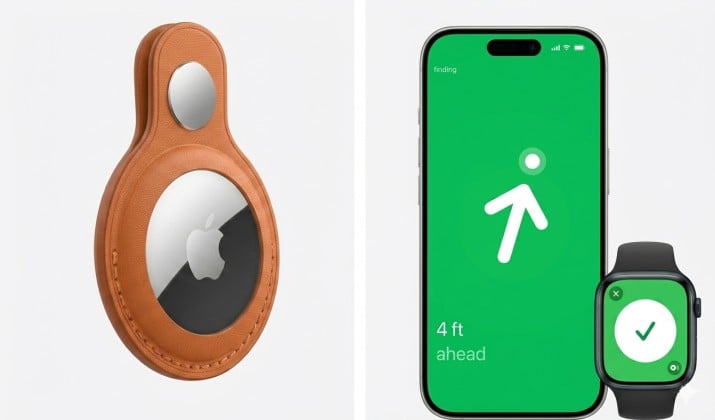
What you CAN do with AirTags on Android:
- Scan an AirTag with NFC: Tap any AirTag with your phone. If it’s in Lost Mode, your browser opens a page with the owner’s contact info. You can help return it.
- Get alerts for unknown trackers: Android’s Unknown Tracker Alerts will tell you if an AirTag is traveling with you and isn’t registered to you.
- Manually scan for nearby trackers: Use Apple’s Tracker Detect app or Android’s built-in scan to check if AirTags are around.
What you CAN’T do with AirTags on Android:
- No pairing: You cannot set up an AirTag with an Android phone. Period. AirTags require the Apple Find My app on iOS to activate.
- No Find My app: Android doesn’t run Apple’s Find My network app, so you can’t see an AirTag’s location on a map.
- No Precision Finding: That ultra-wideband arrow that points you right to your keys? iPhone-only.
- No sound triggers: You can’t make the AirTag play a sound from Android to find it.
So if you hoped to buy an AirTag for your backpack and track it with your Samsung Galaxy, you’re out of luck. Do AirTags work with Android phones for actual tracking? No. They work with Android for safety and lost-item returns only.
Apple AirTag and Find My Network Basics Explained for Android Users
To get why AirTag Android compatibility is limited, you need to know how AirTags work.
AirTags don’t have GPS. They send out a secure Bluetooth signal that gets picked up by nearby iPhones, iPads, and Macs. Those Apple devices anonymously report the AirTag’s location to iCloud. The owner checks the Find My app and sees it on a map.
Think of it like this: AirTags rely on a billion iPhones walking around the world to act as a search party. That’s the Apple Find My network.
If you don’t have an iPhone to pair the AirTag in the first place, it never joins that network as your device. Your Android phone can hear the AirTag’s Bluetooth ping and warn you about it, but it can’t claim ownership or see its location history.
That’s the core reason you can use AirTags with Android for safety, not for tracking your own gear.
Android’s New Unknown Tracker Alerts for AirTags and Bluetooth Trackers
Google got serious about unwanted tracking. Since 2023, Android 6.0+ phones automatically scan for trackers moving with you. This is how to track AirTags on Android if one is following you without permission.
Here’s how Android’s Unknown Tracker Alerts work:
- Your phone listens for Bluetooth trackers that are separated from their owner.
- If an AirTag travels with you for a while, Android pops up a notification: “Tracker traveling with you.”
- Tap it. You’ll see a map of where the tracker was detected with you.
- You can make the AirTag play a sound to find it.
- Android gives you steps to disable it by removing the battery.
This system works with AirTags and most Find My Device network tags. You don’t need to install anything. It’s built into your phone settings under Safety & emergency > Unknown tracker alerts.
Want to do a manual scan? Go to that same menu and hit Scan now. Your phone checks for nearby trackers for 10 seconds. This is key for AirTag stalking and how Android phones help detect unwanted trackers.
Apple’s Tracker Detect App on Android for Scanning Nearby AirTags
Before Google built alerts into Android, Apple released Tracker Detect on the Play Store. It’s still around and still useful.
Tracker Detect won’t run in the background like Android’s native alerts. You have to open it and manually scan. If it finds an AirTag that’s been away from its owner for at least 15 minutes, the app flags it. You can then play a sound to locate it and learn how to disable it.
When should you use it? If your phone runs an older Android version without Unknown Tracker Alerts, or if you want a second opinion after a scan. For most people, Android’s built-in feature covers you. But Tracker Detect is good to have.
This is one of the few official ways Apple supports you when you use AirTags with Android.
NFC Tap To Read an AirTag on Android and See Owner Info in a Browser
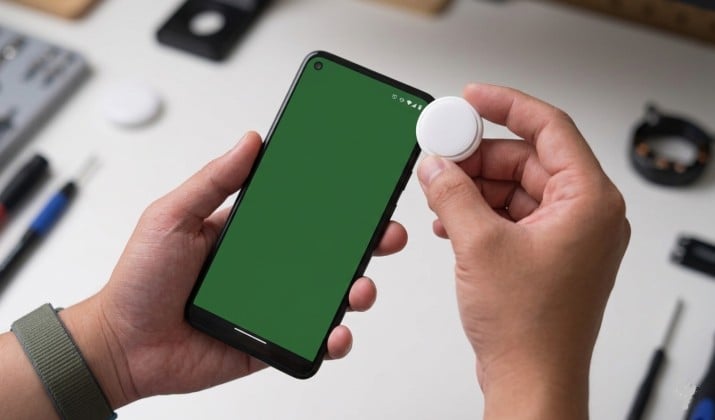
Found an AirTag on your car or in your bag? You can help. You don’t need an app.
Every AirTag has an NFC chip. Wake your Android phone, hold the white side of the AirTag to the back of your phone for a second. Your phone should vibrate and open a browser link to found.apple.com.
If the owner put the AirTag in Lost Mode, you’ll see a message and their phone number or email. Call them. Return it. You just saved someone’s keys.
If it’s not in Lost Mode, you’ll still see the AirTag’s serial number. You can give that to law enforcement if you suspect stalking. This NFC feature is the main reason Apple says AirTags have some Android compatibility. It makes the system safer for everyone.
Apple Find My vs Google Find My Device Network Coverage and Reliability
Here’s where things get interesting for Android users. Apple isn’t the only game in town anymore.
Apple Find My network: Huge. Over a billion active iPhones globally act as detection nodes. Coverage is best in cities, airports, and anywhere iPhones are common. It’s the gold standard for crowdsourced tracking.
Android Find My Device network: Google launched its own version in 2024. It uses the 3+ billion Android phones out there. Any modern Android phone can anonymously help locate lost devices and Bluetooth tags. Its coverage rivals Apple’s in many regions, especially outside the US.
The big difference? AirTags only talk to Apple’s network. They ignore Android phones unless it’s for safety alerts. So if you want reliable item tracking on Android, you need a tag built for Google’s network. That way, you get location updates, sharing, and sound triggers.
Limits of Using AirTags Without an iPhone
Let’s be blunt about what you can and can’t do with AirTags on Android. There’s no pairing, no Find My app, and no Precision Finding. That means no real-time map, no left-behind alerts, and no history of where your item has been.
You also can’t update an AirTag’s firmware with Android. There’s no option to rename it. You can’t share it with family. In fact, you can’t even check its battery from your phone.
If you’re wondering how to track AirTags on Android for your own stuff, the answer is you can’t. You need an iPhone or iPad for setup, and you need one nearby to get value from it.
So while you can use AirTags with Android to stay safe and help others, you can’t adopt one as your own tracker.
Best AirTag Alternatives That Work Natively With Android Phones
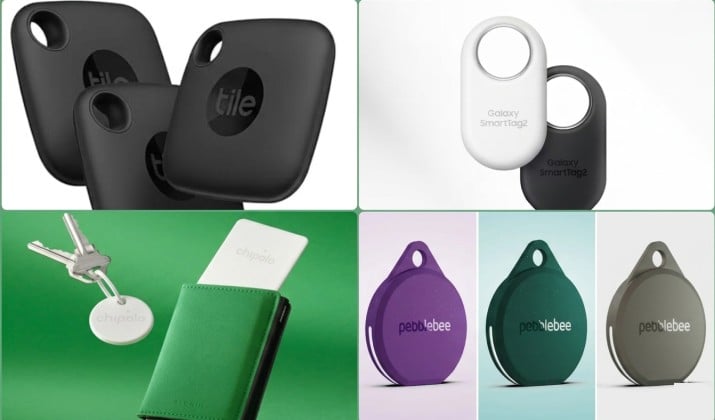
If you want the full AirTag experience on Android, skip AirTags and grab a tag made for your phone. This year, you’ve got great options:
1. Google Find My Device-compatible tags
These are the most direct AirTag rivals. Brands like Chipolo, Pebblebee, and even Motorola make tags that join Google’s network. You pair them in the Find My Device app, see them on a map, make them ring, and share them with friends. Coverage is excellent because they tap into all Android phones.
2. Tile
Tile works with its own app and network. The Tile Pro and Tile Mate are solid. The network is smaller than Google’s or Apple’s, but the app gives you extra features like Smart Alerts and QR codes. Works on both Android and iPhone.
3. Samsung Galaxy SmartTag2
Have a Samsung phone? SmartTag2 uses Samsung’s SmartThings Find network plus the wider Google Find My Device network. You get UWB direction finding if your Galaxy supports it, plus offline finding. It’s the closest thing to Precision Finding on Android.
4. Chipolo ONE Point / Chipolo CARD Point
Chipolo was one of the first Google Find My Device partners. Their Point trackers are loud, have replaceable batteries, and come in keychain or wallet sizes. Super reliable for Android users.
5. Pebblebee Clip / Card / Tag
Pebblebee makes rechargeable trackers for Google’s network. The Clip has a bright LED and works as a key finder. The Card fits in wallets. All support the full Find My Device feature set.
If you use AirTags with Android, you’re stuck with safety features only. With these alternatives, you get the whole package.
Comparison of AirTag vs Android Find My Device Trackers
|
Feature |
Apple AirTag |
Google FMD Trackers |
|---|---|---|
|
Phone Needed for Setup |
iPhone or iPad |
Android phone |
|
View Location on Map |
iOS only |
Android Find My Device app |
|
Crowd Network Size |
1B+ Apple devices |
3B+ Android devices |
|
Precision Finding |
Yes, with UWB iPhones |
Yes, with UWB Android + tag |
|
Play Sound From Phone |
iOS only |
Android app |
|
Unknown Tracker Alerts |
Android + iOS detect it |
iOS + Android detect it |
|
Water Resistance |
IP67 |
Varies, many IPX7/IP68 |
|
Battery |
CR2032, user replaceable |
CR2032 or rechargeable |
If you live on Android, the right column wins for daily use.
So What Should You Actually Do?
Here’s your playbook for this year:
- If someone gave you an AirTag: Keep it. You can’t track your stuff with it, but your Android will warn you if someone uses it to track you. You can also scan it with NFC to help return it if you find one.
- If you want to track your keys, bag, or bike on Android: Buy a Google Find My Device-compatible tag. Chipolo, Pebblebee, and Motorola are safe bets. You’ll get maps, alerts, and sharing.
- If you worry about stalking: Check Settings > Safety & emergency > Unknown tracker alerts on your Android. Run a manual scan if something feels off. You can use AirTags with Android to protect yourself even if you can’t pair them.
- If you carry both iPhone and Android: You could use AirTags, but managing them requires the iPhone. Many people just run two systems: AirTags for iOS, FMD tags for Android.
Wrapping It Up
Do AirTags work with Android phones? Yes and no. For safety and lost-item returns, absolutely. Android will alert you, scan for you, and let you tap an AirTag to contact its owner. That’s important.
But can you buy an AirTag and track your backpack with a Pixel? No. Using AirTags without an iPhone has hard limits. There’s no pairing, no Find My app, and no Precision Finding. Apple keeps that locked to iOS.
The good news is Android caught up. Android’s Unknown Tracker Alerts and the Google Find My Device network mean you don’t need an AirTag anymore. You can use AirTags with Android to stay safe, then buy a Chipolo or Pebblebee to actually track your stuff.
Pick the tracker that matches your phone. You’ll get better coverage, more features, and less frustration. Your keys will thank you.