
You probably typed “is Quizizz free” into Google and landed here. Quick answer: yes, but with limits. Quizizz rebranded to Wayground in late 2024, and the core quiz tool you know is still free for teachers. But the new pricing has shifted, and what you get without paying looks different than it did two years ago.
So is Quizizz still free for teachers after the Wayground rebrand? Yes. You can run live quizzes, assign homework, and use the question library without a credit card. The catch is how much the free plan actually lets you do now that AI tools and advanced reports sit behind paid tiers.
Let’s walk through what’s free, what’s not, and whether upgrading makes sense for your classroom.
Quizizz Free Starter Plan for Individual Teachers Quiz Creation, Live Sessions, Library Access
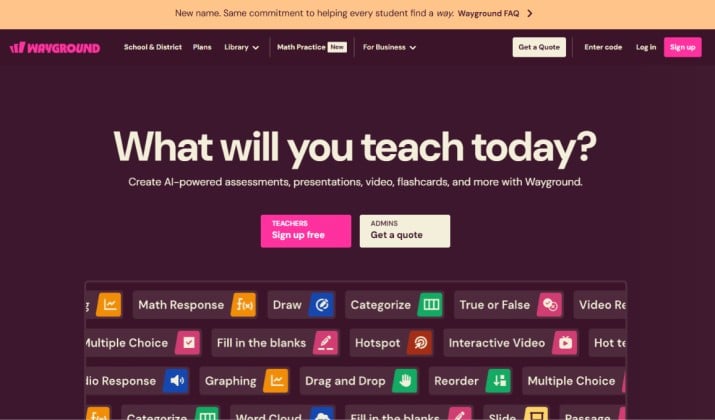
When you sign up, you land on the Quizizz free Basic plan for teachers. Here’s what you get without paying:
- Unlimited live lessons and assignments for up to 30 participants per session
- Create your own quizzes with multiple choice, true/false, and fill-in-the-blank
- Access to the public library with millions of teacher-made quizzes
- Basic reports that show accuracy and time per question
- 5 AI credits per month to try AI-generated questions
You can run your class, assign practice, and see who gets what right. For many teachers, that covers the basics. You don’t need a subscription if you teach smaller groups and don’t need fancy data.
But you hit walls fast. You only get three question types. You can’t use audio, video, or polls. And your reports won’t show standards mastery. If your class has 32 students, two kids sit out or you split the room.
App Links: App Store | Play Store
What Do Teachers Lose When They Only Use the Free Version of Quizizz?
The Quizizz free plan limits gap grew last year. Here’s what the free Starter plan doesn’t include:
- Higher participant limits: You’re capped at 30 live players. Paid plans go up to 500+
- Question types: No drag-and-drop, dropdown, hotspot, graphing, or open-ended with AI grading
- AI tools: You get 5 AI credits monthly. Super gives you 100. Premium is unlimited
- Advanced analytics: No standards tagging, no student mastery tracking, no item analysis
- LMS integrations: Free plan won’t sync grades to Google Classroom, Canvas, or Schoology automatically
- Accommodations: No read-aloud, no translation, no extra time settings for specific students
- Collaboration: You can’t co-edit quizzes with your PLC or department
So is Quizizz really free for teachers or do you need a subscription? It’s free to start. But if you want the tools that save you planning time or help you differentiate, you’ll feel the paywall.
Also read: How to Use Quizizz with Google Classroom
Quizizz Free and Paid Tiers
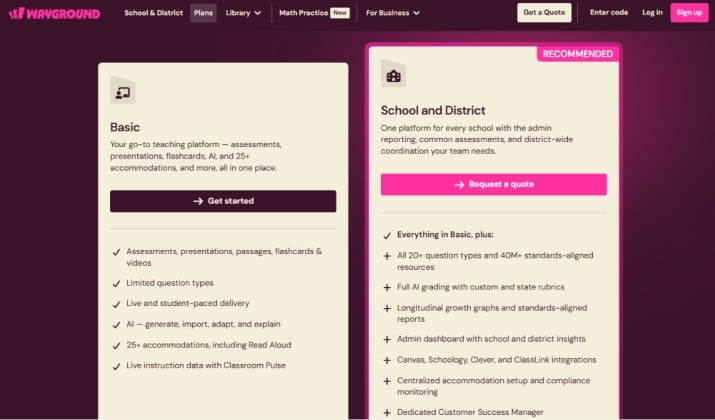
Now let’s break down the Wayground pricing options. And remember, pricing changes. So check the official pricing page for the latest.
Quizizz Free Starter/Basic Plan for Individual Teachers Quiz Creation, Live Sessions, Library Access
Wayground keeps a free tier: Basic. You get unlimited live lessons and homework, 30 participants per session, basic question types, and access to the 20M+ quiz library. No credit card needed.
Quizizz School & District Plans with Custom Pricing and Large Participant Limits
For schools/districts, Wayground offers quote-based plans that unlock: all 20+ question types, AI grading, standards-aligned reports, admin dashboards, 500+ participants, and LMS/Clever integrations. You have to “Request a quote.”
Wayground previously offered individual Super and Premium plans from $5–$19/month. These aren’t listed on the public pricing page anymore. If you’re on a legacy plan, check your account settings. New teachers should expect either Basic or a School plan.
Quizizz Free‑for‑Schools Initiative Unlocking AI and Premium Features for Approved Schools
Heard of the Quizizz Free‑for‑Schools program? Wayground reviews applications from Title I schools and schools with >40% free/reduced lunch. If approved, your whole campus gets Premium access for free.
How to apply for Quizizz Free‑for‑Schools to get lifetime access to AI and premium features?
- Go to the Free-for-Schools page on Wayground’s site
- Submit your school info and admin contact
- Verify eligibility through your district email
- Get approved and roll out to staff
It’s not guaranteed, but if you qualify, you skip the subscription entirely.
Read this too: Is Blooket Plus Worth It?
Quizizz Participant Limits and Question Types on Free vs Paid Plans
The biggest practical difference comes down to two things: how many kids can play, and what kinds of questions you can ask.
Free Starter = 30 players, 3 basic question types.
Premium/School = 500+ players, plus video responses and graphing.
If you teach middle school with 35 kids in a class, the free plan forces you to adapt. If you run PD for 80 teachers, you need a paid tier.
Which Quizizz Plan Should Teachers Choose: Free or Paid?
Ask yourself three questions:
- How many students do you have? Over 30 per session means you need the paid version.
- Do you need data by standard? If admin wants mastery reports, go paid.
- How much time does AI save you? If you build 2+ quizzes a week, 100 AI credits pay for themselves.
Most teachers land on the free plan. It hits the sweet spot for features vs cost. Premium only makes sense if you lead a team or live in data.
Is Quizizz Worth Paying For Compared to Free Alternatives Like Blooket, Kahoot Basic, and Google Forms?
Let’s compare honestly.
Kahoot! Basic is also free but caps you at 40 players. Its individual plan is $9/month, cheaper than Quizizz Super. But Kahoot locks question types and reports harder on free.
Blooket is free with no student limit, which beats Quizizz Basic. But Blooket’s paid Plus at $35.88/year adds question sets and reports. It still lacks Quizizz’s AI tools and standards tracking.
Google Forms is 100% free and unlimited. But you lose game mechanics, memes, and live engagement. It’s a quiz, not a game.
So which tool is better and why? Quizizz wins for teachers who want a balance of engagement, AI, and data. If you just need a quick check-in, Google Forms is better. But, if you want game modes and don’t care about reports, Blooket’s free plan is better.
In case your school already pays for Kahoot, stick with it. But for individual teachers who want to save prep time with AI and get real insights, Quizizz beats the competition.
You get more question types than Kahoot at a similar price, and way better analytics than Blooket. The AI features cut lesson planning time by hours each month. That time matters.
So, Is Quizizz Worth It?
Here’s the real talk.
Why it’s worth paying for:
- You save time. AI question generation and lesson planning are huge. Type a standard and get a full quiz in 30 seconds.
- You get better data. Standards mastery and item analysis help you adjust instruction fast.
- Your students stay engaged. The game layer beats a Google Form every time.
Why you might skip it:
- Your budget is $0. If your school won’t pay and you can’t, Basic still works for small classes.
- You don’t use it often. Paying for monthly bell-ringers doesn’t add up.
- You need unlimited players free. Blooket handles big groups without a subscription.
Quizizz free vs paid teacher plans boils down to scale and time. If you use Quizizz twice a week with 25 students, stay free. If you use it daily, teach 100+ kids, or need accommodations and AI, Super earns its keep.
Try the 7-day trial. Run one unit with full features. If you miss them when they’re gone, you have your answer.